14 Years Of SEO Changes

SEO Changes 

SEO stands for Search Engine Optimisation, the practice of improving a website’s content and structure to increase its visibility and ranking on search engine results pages (SERPs) for relevant user searches. The goal is to attract free, organic traffic to your website by ensuring search engines like Google can easily understand, index, and rank your content. High rankings in search results lead to more clicks, which can increase brand recognition, lead generation, and conversions for businesses.  Search engines use complex algorithms to determine which pages to rank for a given query. SEO involves several key aspects to influence these rankings.

Google Panda Update - Universal App Campaign Logo@seekpng.com


Over the past 14 years (from roughly 2011 to 2025)  SEO has undergone significant transformation. In 2011, SEO primarily revolved around keyword stuffing, link building, and basic on-page tactics designed to influence search engine rankings.  Google’s algorithms were less sophisticated, which meant that manipulating search results was easier and often led to lower-quality content appearing at the top.

As time progressed, major algorithm updates such as Panda, Penguin, and Hummingbird shifted the focus towards quality content, user experience, and relevance. These updates penalised websites employing spammy tactics and rewarded those offering genuine value to visitors. Mobile-first indexing and the rise of voice search further changed the landscape, requiring websites to be optimised for mobile devices and conversational queries.


Google EEAT


GOOGLE  E E A T

Today, SEO is an integrated discipline combining technical expertise, high-quality content creation, and strategic outreach. User intent, site speed, accessibility, and semantic search play crucial roles. 

E E A T , which stands for Experience- Expertise – Authoritativeness – Trustworthiness, is a concept from Google’s Search Quality Rater Guidelines used to evaluate the quality and credibility of content, especially for “Money or Your Life” (YMYL) topics like health and finance. It helps Google identify reliable and authoritative content to rank in its search results, focusing on factors like first-hand experience with the subject, formal credentials, a strong reputation, and the overall accuracy and safety of the information provided.

The importance of E E A T has grown, especially for websites in sensitive areas such as finance and healthcare. Local SEO, video optimisation, and social signals are also now prominent in comprehensive strategies.

In summary, SEO over the past 14 years has evolved from basic manipulative techniques to a sophisticated, user-centred approach. Success now depends on delivering outstanding experiences, authoritative content, and keeping pace with changing search engine algorithms and technology.


Google Panda

Google Panda

Google Panda, a past algorithm update, focused on rewarding high-quality content and penalising low-quality content in search rankings. 

It aimed to filter out “thin” or duplicate content, keyword stuffing, and over-optimised pages, prioritising websites that provided valuable, relevant, and original information to users.

While no longer a separate algorithm, its principles are now embedded in Google’s core ranking system.


Detailed breakdown of Google Panda: 

Google Panda search algorithm update rolled out by Google in 2011,  was to combat low-quality content and improve the overall user experience in search results. It essentially assigns a “quality score” to websites, downranking those with thin, duplicate, or poorly written content, while boosting those with high-quality, original, and engaging content.


Focus on Quality:

Panda evaluated websites based on content quality, user experience, and authority.


Penalised Low-Quality Content:
It demoted websites with thin content, duplicate content, keyword stuffing, and excessive advertisements. It favored websites with original, well-written, and user-friendly content.


Impact on Search Rankings:
Panda’s updates could significantly alter search rankings, pushing down low-quality sites and elevating high-quality ones.


Integration into Core Algorithm:
While initially a separate filter, Panda was integrated into Google’s core ranking algorithm in 2016, meaning its principles are now part of how Google determines rankings.


Long-Term Impact:
Panda’s focus on quality continues to be relevant today, as Google prioritises websites that offer valuable content to users, according to Search Logistics and Loganix.


Websites Made Easy


SEO Glossary 2026

SEO GLOSSARY 2026

Learning SEO terms involves understanding core concepts like keywords, on-page SEO (optimising content/code), off-page SEO (building authority via backlinks), and technical SEO (site structure, speed), all to improve visibility on Search Engine Results Pages (SERPs) for users, explained through terms like Crawlers, Indexing, Title Tags, Meta Descriptions, and Domain Authority. Key steps include keyword research, creating quality content, and earning quality links to rank higher in search results.

Our A-Z SEO Glossary will help you to understand more about the many ins and outs of search engine optimisation for your website. Learning SEO is crucial for increasing online visibility, driving quality organic traffic, building brand awareness, and boosting revenue by helping websites rank higher in search results, making them discoverable to users actively looking for products or information, and it’s a foundational skill for many digital marketing careers. It’s cost-effective, provides long-term value, and improves user experience, making it essential for business growth and a strong online presence.


SEO GLOSSARY 2026

Search Engine Optimisation (SEO): The process of improving a website’s visibility in search engine results pages (SERPs).

Search Engine Results Page (SERP): The page displayed by a search engine in response to a user’s query.

Keywords: Words or phrases that people type into search engines to find information.

Algorithm: The set of rules that search engines use to rank web pages.

Crawling: The process by which search engines discover new and updated web pages.

Indexing: The process by which search engines store crawled web pages in their database.

Ranking: The position of a web page in the search results for a specific keyword.

Link Building: The process of acquiring backlinks to a website.

Organic Traffic: Website traffic generated from unpaid search results.

Paid Search: Traffic generated from paid advertising on search engines.

User Experience (UX): The overall experience a user has when interacting with a website.

On-Page SEO: Optimising individual web pages to improve their search engine ranking.

Title Tag: The HTML element that specifies the title of a web page.

Meta Description: The HTML element that provides a brief summary of a web page’s content.

Header Tags: HTML tags (H1, H2, H3, etc.) used to structure content and indicate headings.

Internal Links: Links from one page on a website to another page on the same website.

Alt Text: A text description of an image used by search engines and screen readers.

URL Structure: The structure of a website’s URLs, which can affect SEO.

Page Speed: The speed at which a web page loads.

Off-Page SEO: Actions taken outside of a website to improve its search engine ranking.

Backlinks: Links from other websites to a specific website.


Domain Authority/Domain Rating: Metrics that predict a website’s ranking potential.

Link Building: The process of acquiring backlinks.

Anchor Text: The visible, clickable text of a hyperlink.


Other Important Terms

Black Hat SEO: Unethical or manipulative SEO practices.
White Hat SEO: Ethical SEO practices that comply with search engine guidelines.
Canonical URL: The preferred version of a web page when multiple versions exist.
Duplicate Content:  Duplicate content means the same (or very similar) content is on more than one webpage, most typically appearing on the same website in different places


General SEO Concepts

Search Engine Optimisation (SEO): The process of improving a website’s visibility in search engine results pages (SERPs). 

Search Engine Results Page (SERP): The page displayed by a search engine in response to a user’s query. 

Other Important Terms
  • Keywords: Words or phrases that people type into search engines to find information. 
  • Algorithm: The set of rules that search engines use to rank web pages. 
  • Crawling: The process by which search engines discover new and updated web pages. 
  • Indexing: The process by which search engines store crawled web pages in their database. 
  • Ranking: The position of a web page in the search results for a specific keyword. 
  • Link Building: The process of acquiring backlinks to a website. 
  • Organic Traffic: Website traffic generated from unpaid search results. 
  • Paid Search: Traffic generated from paid advertising on search engines. 
  • User Experience (UX): The overall experience a user has when interacting with a website. 

On-Page SEO
  • On-Page SEO: Optimising individual web pages to improve their search engine ranking. 
  • Title Tag: The HTML element that specifies the title of a web page. 
  • Meta Description: The HTML element that provides a brief summary of a web page’s content. 
  • Header Tags: HTML tags (H1, H2, H3, etc.) used to structure content and indicate headings. 
  • Internal Links: Links from one page on a website to another page on the same website. 
  • Alt Text: A text description of an image used by search engines and screen readers. 
  • URL Structure: The structure of a website’s URLs, which can affect SEO. 
  • Page Speed: The speed at which a web page loads. 

Off-Page SEO:
  • Off-Page SEO: Actions taken outside of a website to improve its search engine ranking. 
  • Backlinks: Links from other websites to a specific website. 
  • Domain Authority/Domain Rating: Metrics that predict a website’s ranking potential. 
  • Link Building: The process of acquiring backlinks. 
  • Anchor Text: The visible, clickable text of a hyperlink. 
How Does A Product Feed Work?

Amazon Store


PRODUCT FEEDS 

Product feeds  are essential for ecommerce businesses because they serve as the foundation for listing and managing products across various online platforms.  Product feeds can be used to display, advertise, and sell products on multiple channels such as Google, Facebook, Instagram, or Amazon.

A product feed is a digital file, often in formats like CSV, XML, or JSON, that contains structured information about products sold by an online retailer. It typically includes details such as product title, description, price, availability, images, brand, SKU (Stock Keeping Unit), and other relevant attributes.  A product feed acts as a bridge between an online shop and external sales channels, ensuring that product information is efficiently and accurately shared wherever your customers are shopping.   

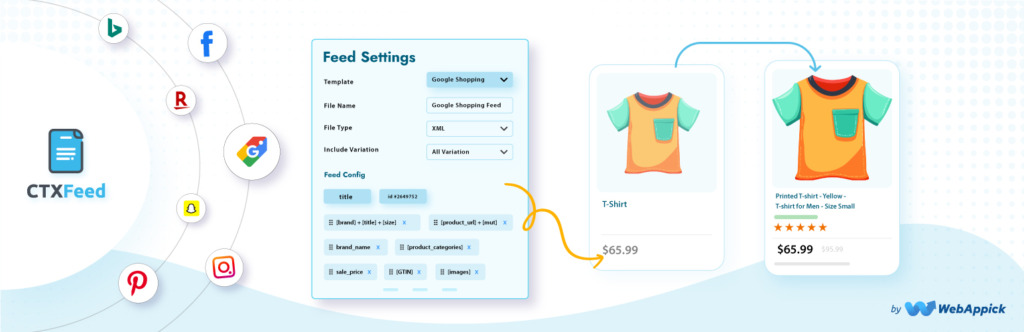
WooCommerce feed plugins enable merchants to generate product feeds for Google Shopping, Facebook/Instagram, TikTok, and over 100+ platforms to increase visibility. Leading options include Product Feed PRO by AdTribes, CTX Feed, and Product Feed Manager for WooCommerce. These tools offer features like unlimited feeds, category mapping, and automatic synchronisation.


Benefits Of Using Product Feeds

Top WooCommerce feed plugins enable merchants to generate product feeds for Google Shopping, Facebook, Instagram, TikTok, and over 100+ platforms to increase visibility. Leading options include Product Feed PRO by AdTribes, CTX Feed, and Product Feed Manager for WooCommerce. These tools offer features like unlimited feeds, category mapping, and automatic synchronisation.

• Enables automated product listing and management across multiple channels
• Helps maintain consistency and accuracy in product information
• Makes it easier to scale and reach more customers through various platforms
• Simplifies synchronisation of inventory and pricing


How A Product Feed Works

1. Creation: Retailers generate a product feed from their e-commerce platform or inventory management system. This feed is kept up to date with the latest product information.

2. Submission: The feed is uploaded or automatically sent to various e-commerce channels such as Google Shopping, Amazon, Facebook Marketplace,  or price comparison sites.

3. Processing: The channel imports the feed, reads the product data, and checks for errors or missing information. Channels may require the feed to meet specific formatting and content guidelines.

4. Display: Valid product listings are displayed on the channel’s platform, allowing customers to browse, search, and compare products.

5. Updates: The feed is updated regularly (sometimes multiple times a day) to reflect changes in stock, pricing, or product details, ensuring that listings are accurate and up to date.


Key Features To Look For

An optimised “product feed” is the foundation of successful e-commerce advertising on platforms like Google Shopping, Facebook, and Instagram. It acts as the data source that informs algorithms what you are selling and to whom.

  • Multi-Channel Support:  Ability to generate feeds for Google, Facebook, TikTok, Bing, and Pinterest.
  • Automated Updates:  Scheduled feed updates ensure inventory and pricing remain accurate across channels.
  • Product Filtering:  Rules to exclude out-of-stock items or specific categories.
  • Attribute Mapping:  Flexibility to map WooCommerce data to required channel fields.

These plugins often offer freemium models, with free versions covering basic needs and pro versions providing unlimited, faster, and more advanced features. 


Paying For Product Feeds

Paying for product feeds involves using a third-party service or platform to manage and distribute your product data across various online channels. This often includes creating, optimising, and maintaining the product feed, which is a structured file containing product information. These services can help automate updates, improve data accuracy, and expand your reach to new sales channels, ultimately boosting sales and revenue.


Top WooCommerce Feed Plugins

Top WooCommerce feed plugins enable merchants to generate product feeds for Google Shopping, Facebook/Instagram, TikTok, and over 100+ platforms to increase visibility. Leading options include Product Feed PRO by AdTribes, CTX Feed, and Product Feed Manager for WooCommerce. These tools offer features like unlimited feeds, category mapping, and automatic synchronisation.


CTX Feed – WooCommerce Product Feed Generator:


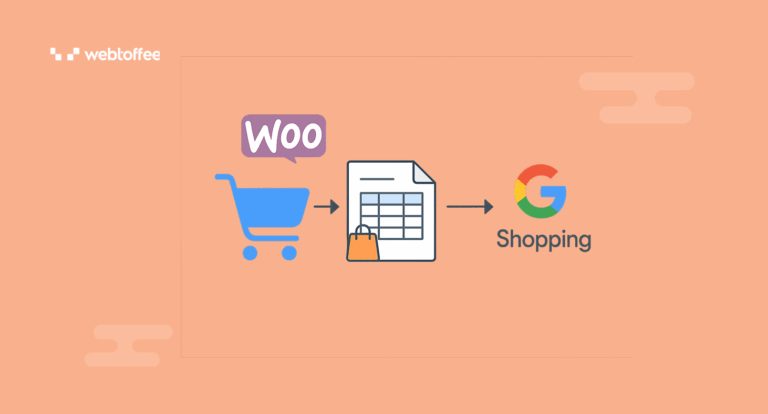
WebToffee Product Feed for WooCommerce: Designed to create optimised feeds specifically for social commerce platforms.


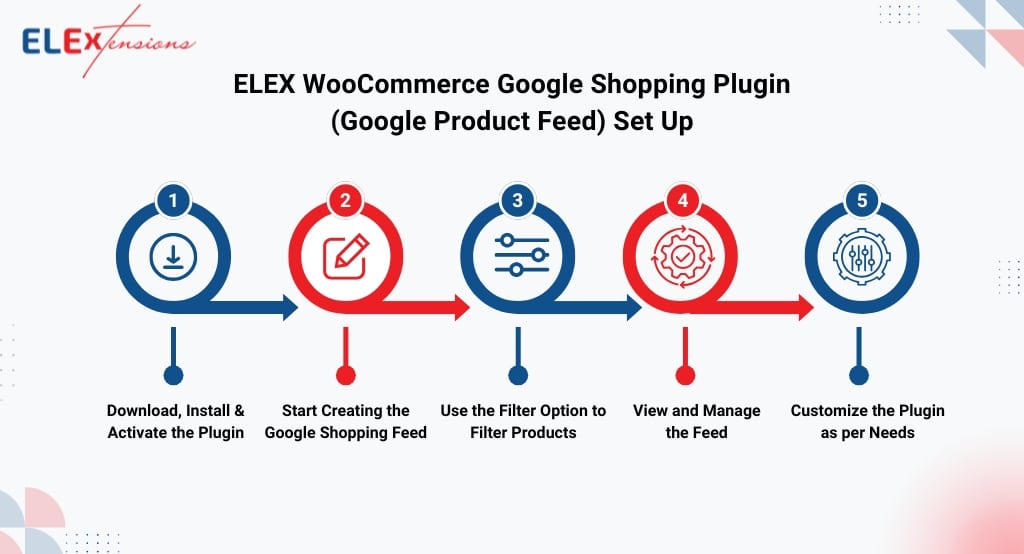
ELEX WooCommerce Google Shopping Feed: Offers high-level control and precise customisation specifically for Google Shopping feeds. 

ELEX WooCommerce Google Shopping Feed


Amazon Product Feed Explained

Amazon Store Product Feed


Amazon Product Feed

An Amazon product feed is a structured file containing detailed information about products that sellers wish to list on Amazon. This feed is essential for efficiently uploading, managing, and updating multiple products at once, making it particularly valuable for businesses with large inventories.


What Is Included In An Amazon Product Feed?

  • Product Identifiers:  Unique codes like ASIN, SKU, UPC, or EAN that help Amazon recognise and categorise each product.
  • Product Details: Attributes such as product name, brand, description, bullet points, and images.
  • Pricing Information: The price of each item, including any discounts or special offers.
  • Inventory Levels: The quantity of each product available for sale.
  • Shipping Details: Weight, dimensions, and handling time.
  • Category Data: The relevant category or department for the product, ensuring it appears in the correct search results.

How Does an Amazon Product Feed Work?

Amazon sellers create product feeds using templates provided by Amazon, typically in formats like CSV, TXT, or XML. These files are then uploaded through Amazon Seller Central or via Amazon’s API. The system processes the feed, updating the seller’s catalogue and making the products available to customers on the marketplace.


Benefits of Using a Product Feed

  • Efficiency: List and update hundreds or thousands of products simultaneously, saving time compared to manual entry.
  • Accuracy: Reduce errors and inconsistencies by standardising product information.
  • Scalability: Easily add new products or adjust existing listings as your business grows.
  • Competitive Advantage: Keep your listings up to date with the latest prices, stock levels, and promotions.

Tips for Success
  • Ensure your product data is accurate, complete, and complies with Amazon’s listing policies.
  • Regularly update your feed to reflect changes in inventory and pricing.
  • Use high-quality images and well-crafted descriptions to improve visibility and sales.

In summary, an Amazon product feed is a powerful tool for sellers, enabling efficient management of product listings and helping to maximise sales opportunities on the world’s largest online marketplace.

An alternative to an Amazon Product Feed depends on what you’re trying to achieve. If you’re looking for a way to manage product data for different sales channels, Google Shopping feeds, Walmart Marketplace, or feed management platforms like Feedonomics or GoDataFeed are good options.

Yoast SEO vs Rank Math vs All In One SEO


Yoast SEO vs Rank Math vs All In One SEO

Yoast SEO vs Rank Math vs All In One SEO. Yoast SEO, Rank Math, and All in One SEO (AIOSEO) are top WordPress plugins, with Yoast great for beginners and content analysis; Rank Math offering unmatched features in its free version (like 404 monitoring, schema, & advanced metrics) with a slight learning curve; and AIOSEO providing an easy-to-use interface and strong local SEO/schema tools, though its free plan is basic.Rank Math often wins on value for advanced features, while Yoast is a trusted, stable classic, and AIOSEO shines for local businesses and beginners.


Video Timeline:

0:00:  Overview
0:13:  Redirections
1:00:  404 Monitor
2:07:  Remove Category Prefixes
3:39:  User Roles
4:25:  Schema Markup
5:50:  Keyphrase – Multiple and suggestions
7:27:  Social Media Sharing
9:05:  Image Optimisation
10:39: Local SEO
11:41: Advanced Custom Fields integration
12:24: WooCommerce integration

Key Free AI Features In Rank Math

Rank Math offers a free version with core SEO features. While the free version has limitations, such as a limit on the number of focus keywords, it provides essential tools for optimising a website for search engines. For more advanced features and capabilities, RankMath also offers a premium, paid version. Rank Math free is better than Yoast free, and Rank Math Pro is also better than Yoast Premium. It was rated the #1 WordPress SEO plugin in most Facebook polls. Rank Math is a comprehensive solution for anyone wanting to boost their WordPress SEO with AI, even on a budget.

Content AI Credits: Get 750 free credits monthly to use AI tools for writing, research, and optimization.
In-Editor Suggestions: AI provides real-time advice on headings, keywords, word count, and structure directly in your post editor.
SEO Score Analysis: Deep content analysis helps you meet best practices for ranking.
AI Tools: Access AI for generating meta tags, answering questions, and more.
RankBot: Use RankBot for a single session to assess content effectiveness.


How to Get Started

Install: Add the Rank Math SEO plugin to your WordPress site.
Create Account: Register for a free Rank Math account.
Connect: Link your WordPress site to your Rank Math account via the plugin settings.
Refresh Credits: Go to Rank Math SEO > General Settings > Content AI in your dashboard to refresh your monthly credits.


Amazon Barcodes Explained


UPC vs FNSKU vs ASIN

Amazon Barcodes Explained!

NO MORE CONFUSION! Avoid costly mistakes by understanding the difference between product identifiers! Find out the difference between UPC vs FNSKU vs ASIN (and more), as well as when to use each one in this Amazon barcodes explainer video. Watch now!

VIDEO TIMELINE 

Intro  0:00
GTIN: 0:59
UPC: 1:33
EAN:  1:42
SKU: 5:06
ASIN: 6:12
FNSKU: 7:35
Recap 10:11

Product Identifiers 

Product identifiers are unique codes (like GTINs, UPCs, EANs, ISBNs, SKUs, MPNs) that distinguish specific items for tracking, selling, and inventory; the main differences lie in their scope (global vs. internal), format (digits/letters), and who assigns them (manufacturer vs. retailer/platform), with GTINs (like UPC/EAN) being globally recognised standards, SKUs being retailer-specific, and MPNs being manufacturer-defined, while platform-specific ones like Amazon’s ASIN are unique to that marketplace.  Think of a GTIN as a product’s unique fingerprint or social security number, allowing computers and people to instantly know exactly which item is being scanned or listed, whether at a supermarket checkout or on a website. 

GTINs, UPCs, EANs, ISBNs, SKUs, and MPNs are all product identifiers: standardized codes like GTIN (Global Trade Item Number) (including UPCEAN, ISBN) identify products globally for retail, while SKU (Stock Keeping Unit) and MPN (Manufacturer Part Number) are internal or manufacturer-specific codes for inventory/tracking, helping with online visibility, sales, and inventory management across platforms like Amazon or eBay. 

GTINs, UPCs, EANs, ISBNs, SKUs, and MPNs are all product identifiers: standardized codes like GTIN (Global Trade Item Number) (including UPCEANISBN) identify products globally for retail, while SKU (Stock Keeping Unit) and MPN (Manufacturer Part Number) are internal or manufacturer-specific codes for inventory/tracking, helping with online visibility, sales, and inventory management across platforms like Amazon or eBay. 

Self-employed? Register Online For Self Assessment


Self Employed – How do I register online for Self Assessment 

Watch this video for a step-by-step guide to registering online for Self Assessment if you’re self-employed.

0:00 – Introduction
0:17  –  Register for Self Assessment
0:30 –  What is self-employed?
1:15  – Government gateway account
1:46  – Sign in using Business Tax Account to register
4:45  – Unique Taxpayer Reference
5:12  –  Register by 5 October
5:25  –  Submit your tax return
5:35  –  Further help and support

Visit GOV.UK:  https://www.gov.uk/hmrc

For Guidance on registering for Self Assessment for the self-employed :

HMRC is the UK’s tax, payments and customs authority. HMRC  collect the money that pays for the UK’s public services and help families and individuals with targeted financial support.

Google Drive for Beginners


Google Drive for Beginners – The Complete Course
Including Docs, Sheets, Forms, And Slides

Google Drive is a cloud-based file storage and synchronisation service developed by Google. It allows users to store files online, access them from any device, and share them with others. In essence, it’s a central hub for your files in the cloud, offering features like file storage, synchronisation, and collaboration.  Google Drive statistics show that over 1 billion people use Google Drive, making it one of the most popular cloud storage facilities across the globe.

In this comprehensive video, you’ll learn how to use Google Drive to create, backup, manage, and find your files. You’ll also learn how to use the four essential Google Drive apps: Google Docs, Google Sheets, Google Forms, and Google Slides.

Google Drive has a massive user base, with over 2 billion monthly active users, encompassing individuals, educational institutions (over 80% of US higher ed), and businesses using it for file storage, collaboration, and within Google Workspace. While exact real-time numbers vary, estimates place it as one of the leading cloud storage services, integrated deeply with Google’s ecosystem.


Table of Contents:

Read More
00:00 – Introduction
00:31 – USING GOOGLE DRIVE
01:20 – Creating Files in Google Drive
04:20 – How to Find and Access Items in Your Drive
05:50 – Changing Google Drive View Settings
06:20 – Search Google Drive for Your Files
07:05 – Working with Microsoft Office Files
09:33 – Sharing from Google Drive
12:39 – More Tips for Organising Your Drive
16:53 – Setting up a Shared Folder
19:00 – USING GOOGLE DOCS
21:35 – Collaborating with Other People
25:19 – Using Version History
28:06 – USING GOOGLE SHEETS
30:58 – The Anatomy of a Spreadsheet
36:09 – Entering Data into Google Sheets
39:15 – Sorting Numbers and Text
40:51 – Common Functions
44:55 – Charts
50:43 – USING GOOGLE FORMS
01:02:07 – USING GOOGLE SLIDES
01:04:02 – Adding Text to Google Slides
01:06:49 – Adding Visuals to Your Google Slides
01:12:10 – Adding Videos to Google Slides
01:13:25 – Sharing a Google Slides Presentation
01:15:59 – How to Present a Slideshow to a Group
 ASIN Numbers At Amazon 

 ASIN Numbers At Amazon 


ASIN Numbers 

Amazon has assigned approximately 741 billion ASINs (Amazon Standard Identification Numbers) since their introduction. Each ASIN is a unique 10-digit identifier that Amazon uses to track products within its catalog. These ASINs are crucial for organising and identifying the vast number of items sold on Amazon.

There are approximately 100,000 UK small and medium-sized businesses (SMEs) selling on Amazon. Many of these businesses are located outside of London. In 2023, UK SMEs selling on Amazon recorded over £3.8 billion in export sales according to About Amazon UK.


The Importance Of ASIN Numbers At Amazon 

Product identification: ASINs help Amazon track and manage its enormous catalog of products. An ASIN, or Amazon Standard Identification Number, is a unique 10-character alphanumeric identifier that Amazon assigns to each product in its catalog. It helps Amazon organise and track its vast inventory, ensuring efficient product management and accurate search results. Think of it as a barcode specific to Amazon.


Here’s A More Detailed Explanation:


Unique Identifier:
Every product on Amazon, with the exception of books, has a unique ASIN. Books use their ISBN (International Standard Book Number) as the ASIN.


Purpose: ASINs are crucial for sellers to list products, manage inventory, and ensure accurate product information is displayed.


Structure: ASINs are 10-character alphanumeric codes.


Finding ASINs: You can find the ASIN on the product’s detail page, usually in the URL or within the product details section.


Importance for Sellers: ASINs are essential for sellers because they allow customers to find specific products, manage inventory, and avoid listing duplicates.


Marketplace Specific: ASINs can vary between different Amazon marketplaces (e.g., Amazon.com, Amazon.co.uk).


Parent-Child Relationships: Products with variations (like different sizes or colors) have a parent ASIN for the general product and separate child ASINs for each variation.


ASIN

ASIN (Amazon Standard Identification Number) numbers are free for the vast majority of sellers on Amazon. Amazon automatically assigns an ASIN to each product listed in its catalog. There is no cost to acquire or generate an ASIN. While most sellers won’t incur any ASIN-related costs, high-volume sellers (over 100,000 products) may be charged a small monthly fee per ASIN.


Here’s A More Detailed Breakdown:


No cost for standard sellers:
 
If you’re selling a product that already exists on Amazon, you don’t need to create a new ASIN. You simply match your product to the existing one.


Automatic assignment: When you list a new product on Amazon, the system automatically assigns it a unique ASIN.


Potential fees for high-volume sellers: According to Amazon’s seller fees page, if you are a large-scale seller with over 100,000 listed products, Amazon may charge a small monthly fee (e.g., $0.005 per ASIN).


When Do You Create A New ASIN?

A new ASIN (Amazon Standard Identification Number) is created when a product is not already listed in the Amazon catalog. If the product already exists, you should match your product to the existing ASIN; creating a duplicate ASIN is prohibited.

Selling On eBay UK

Selling on eBay


eBay Global Online Auctions

eBay is a global online auctions and trading company launched by American entrepreneur Pierre Omidyar in 1995. eBay operates in 190 markets worldwide. While the company facilitates sales in many countries, it has specific, dedicated country-specific sites for some regions. For example, eBay has sites for the US, UK, Canada, Australia, and others. These country-specific sites help tailor the marketplace to local needs and shopping behaviors .


Selling On eBay UK

While the exact number of active sellers on eBay UK fluctuates, it’s estimated that over 4 million eBay users in the UK list at least one item each month. This figure includes both business sellers and individual consumers listing items for sale, according to ChannelX. Additionally, there are now around 190,000 registered businesses on eBay UK.

  • Active Monthly Sellers: Over 4 million UK users list items on eBay each month.
  • Registered Businesses: Approximately 190,000 businesses are registered on eBay UK.
  • Large Seller Base: eBay UK has a substantial number of sellers, with 29% of global eBay sellers based in the UK, according to Business of Apps. 
  • Fashion Category:  A significant portion of sellers, around 40,000 businesses and 600,000 consumer sellers, focus on the fashion category. 

What Is Involved Selling On eBay?

Selling on eBay UK involves creating an account, listing items with descriptions and photos, setting shipping options, and managing sales and customer service. For UK-based private sellers, it’s free to list up to 300 items per month, with no final value fees when the item sells (excluding vehicles). Business sellers, however, pay listing and transaction fees.

eBay reported a revenue of 1.4 billion euros (1.5 billion dollars) in the United Kingdom last year, however this figure over a hundred million dollars less than the year before. In Germany, revenue remained more or less stable. The company is performing better elsewhere. 

SecondSalecom and musicMagpie are consistently mentioned as top sellers, particularly in categories like books, electronics, and auto parts, according to Marketplace Pulse. Other strong performers include sellers specialising in mobile phones and accessories, health and beauty products, and home goods. 

To determine the absolute “biggest” seller, you’d need to consider factors like total revenue, feedback score, and the number of items sold. While individual sellers might have high feedback scores, overall revenue might be higher for sellers in high-volume categories. 


  • Mobile Phone & Accessories: This category remains a strong performer, with both new and pre-owned devices selling well.

  • Electronics: Refurbished gadgets, smartwatches, drones, and VR headsets are popular, according to AMZScout.

  • Home Products: The home products  category, including home decor and furniture, is also a significant contributor to eBay UK’s sales.

  • Health and Beauty:  Many prioritise their appearance, making this a strong category with products like skincare.

  • Other Note Worthy Categories: Bicycle parts, trading cards, and luxury goods are also emerging growth areas, (Ref: Accio). 

Selling On eBay UK: A Step-By-Step Guide

Selling on eBay UK can be a straightforward way to reach a wide audience and earn extra income. Here’s a guide to help you get started:

1. Create an eBay Account
Go to eBay UK and sign up for an account if you don’t already have one.
Set up your profile and add your contact and payment details.

2. Research Your Item
Search for similar items on eBay to see how they are listed and what prices they are fetching.
Check completed listings to gauge what buyers are willing to pay.

3. Create an Attractive Listing
Choose a clear, descriptive title for your item.
Write a detailed description, including the item’s condition, brand, and any flaws.
Take high-quality photos from various angles.
Select the correct category and item specifics to help buyers find your listing.

4. Set Your Price
Choose between auction-style or fixed price (‘Buy It Now’) listings.
Set a realistic starting price or fixed price based on your research.

5. Choose Postage Options
Select the postage service(s) you’ll offer (e.g., Royal Mail, courier).
Decide if you’ll offer free postage or charge buyers.
Clearly state your dispatch times and whether you ship internationally.

6. Manage Your Listing
Respond promptly to queries from potential buyers.
Consider offers or adjust your price if needed.

7. Complete the Sale
Once your item sells, send an invoice if required and confirm the buyer’s payment.
Package the item securely and post it promptly.
Mark the item as dispatched on eBay, and provide tracking information if available.

8. Receive Payment
eBay now manages payments directly, so funds are sent to your linked bank account after the buyer pays.
Check your eBay account for payment status updates.

9. Leave Feedback
Leave feedback for the buyer to help build trust within the eBay community.
Encourage the buyer to do the same for you.

Tips for Success

  • Be honest and accurate in your descriptions to avoid disputes.
  • Respond to messages quickly to maintain good communication.
  • Keep an eye on eBay fees and factor them into your pricing.
  • Package items securely to prevent damage in transit.

For more details, visit the eBay UK Seller Centre.