Teaching and Learning Courses

Supporting Teaching & Learning Courses

Supporting Teaching and Learning (STL) courses, often at Levels 2 and 3, are qualifications for individuals working or volunteering as teaching assistants or learning support staff in schools and colleges. They provide essential training in safeguarding, child development, classroom management, and supporting lesson delivery. These courses, often available via local colleges or online providers, typically require a practical school placement.

As of the November 2024 school workforce census, there are approximately 288,800 full-time equivalent (FTE) teaching assistants employed in state-funded schools in England. This number represents a significant increase in support staff, with around two-thirds of these roles working within primary schools.

As of November 2024, there were 14,675 teaching assistants (50.2% of support staff) employed in local authority-maintained schools in Wales. When including higher-level teaching assistants (HLTAs) and ALN support staff, the number of classroom-focused support staff is higher, within a total of 29,250 school support staff.

Teaching assistants (TAs) in the UK typically earn between £19,000 and £26,000 annually for full-time roles, with starting salaries around £19,000–£22,366. Experienced TAs or Higher Level Teaching Assistants (HLTAs) can earn up to £29,000–£45,000+. However, many TAs work term-time only, often resulting in actual take-home pay between £13,000 and £15,000.


Key Aspects Of STL Courses Include:

Levels And Focus:

Level 2:
Focuses on foundational knowledge for classroom support.

Level 3: Aimed at those looking to upskill, offering deeper, more technical knowledge of supporting learning, assessment, and special needs (SEND).


Core Topics:

Supporting Learning: Assisting with lesson planning, delivery, and assessment alongside teachers.
Child Development: Understanding children’s development, behaviour, and communication.
Safeguarding: Understanding policies for protecting children and young people.
Professional Development: Reflective practice, promoting equality, and fostering positive relationships.


Delivery And Requirements:

Placement: Usually requires a school placement (often one to two days per week).
Assessment: Coursework, projects, and practical assessments within the workplace.
Entry: Generally for those 19+ with relevant, albeit sometimes voluntary, experience.

These courses are nationally recognised qualifications, such as NCFE CACHE or City & Guilds, providing a pathway for career advancement in education.


Teaching Assistants (TAs)

Teaching assisants typically progress through four main levels of qualification and responsibility, ranging from general classroom support (Level 1) to higher-level, specialised roles (Level 4 or 5). These levels define the scope of support provided to teachers and students, with higher levels involving more specialised knowledge and increased responsibility, such as covering classes or leading interventions.

  • Level 1: Focuses on basic classroom support, such as helping with preparation, setting up resources, and supporting general learning.
  • Level 2: Involves more direct interaction, such as supporting individual students, working with specific groups, and assisting with Special Educational Needs (SEN).
  • Level 3: This is often considered the standard, fully qualified level, where TAs have a deeper understanding of child development and can take on more independent responsibilities, including planning support activities.
  • Level 4 / HLTA: Known as Higher Level Teaching Assistants (HLTA), these professionals often cover classes, lead specific interventions, and have higher-level expertise.
  • Level 5: Some specialised roles or advanced qualifications, such as senior SEN support or intervention coordinators, can reach this level.

Costs Of Courses

Many teaching assistants start at level 2 or 3 and progress to become HLTAs over time, with training often taking the form of apprenticeships or specific qualifications.  Teaching Assistant (TA) qualification costs vary by level and provider, generally ranging from approximately £200 to over £1,400 for accredited online courses. Level 2 certificates typically cost £300–£700, while more advanced Level 3 Diplomas cost £500–£950, with many providers offering payment plans. Some introductory courses are available for as low as £19–£50.


WordPress Image Gallery Plugin

Buy Learn English Activity Books: Speak English Write English


Costs for Teaching and Learning courses in the UK, such as Post Graduate Certificate in Education (PGCE) or Initial Teacher Training (ITT), typically range from £7,335 to £9,790 per year for UK applicants, with non-UK citizen fees averaging around £15,000 per year.

Shorter, specialised courses like the Level 3 Award or Level 4 Certificate in Education and Training often range from £270 to £599. Completely online.  Level 3 Award in Education and Training (PTLLS).  No previous experience needed. Qualifications regulated by OFQUAL. You can Enrol instantly and start today. Level 3 Award in Education and Training (PTLLS)


Key Costs By Qualification Level

Level 2 Certificate (Basic): £300 – £700, with some online options as low as £219.
Level 3 Diploma (Standard): £500 – £950. A popular option is to pay a deposit (e.g., £47.50) followed by monthly installments.
Level 4 (HLTA – Higher Level): £500 – £1,400.

Alternative Routes: Some courses are advertised as free, though these may be introductory or, in some cases, funded via government schemes.


Additional Considerations
  • Duration: Courses can take up to 2 years to complete if mixed with on-the-job training.
  • Provider Differences: eLearning College offers free, unaccredited courses, while The Learning College offers accredited, paid options.
  • On-the-job Training: Some schools provide training, allowing for employment without upfront qualification costs.

NOTES

PTLLS
stands for Preparing to Teach in the Lifelong Learning Sector, an introductory teaching qualification in the UK that has now been replaced by the Level 3 Award in Education and Training (AET), but the acronym is still commonly used.

It’s a foundational qualification for individuals wanting to teach adults in colleges, workplaces, or community settings, focusing on planning and delivering training without needing prior teaching experience.
Google Career Certificates

Google Career Certificates


Google Career Certificates

Introduction

Google Career Certificates are professional training programmes developed by Google to equip individuals with job-ready skills in high-demand fields, especially in the digital and technology sectors. These certificates are designed for people from all backgrounds, whether they are looking to start a new career, enhance their current skills, or change career paths entirely. Google provides 10,000 scholarships across the UK through their partners, Google.org grantees, and their networks.


Overview Of The Programmes

Google Career Certificates focus on several key areas within the digital world, such as IT Support, Data Analytics, Project Management, UX Design, Cybersecurity, and Digital Marketing & E-commerce. Each course is developed in collaboration with leading industry experts and employers to ensure the curriculum remains relevant and practical.


Who Can Benefit?

These certificates are ideal for those who do not have a traditional college degree or prior experience in the field. The courses are open to everyone and are particularly useful for career changers, recent graduates, or anyone wishing to upskill in the digital economy. The flexible, online nature of the courses means they can be completed around work or other commitments.


Structure And Delivery

  • Self-paced online learning, allowing students to progress according to their schedule.
  • Typically completed within three to six months, depending on the learner’s pace.
  • Courses feature a blend of video lectures, hands-on labs, quizzes, and practical assignments.
  • Offered on platforms such as Coursera, making them accessible globally.

Key Certificate Programmes
  • IT Support: Covers troubleshooting, customer care, networking, operating systems, system administration, and security.
  • Data Analytics: Teaches data cleaning, analysis, visualisation, and tools such as spreadsheets, SQL, and Tableau.
  • Project Management: Explores project planning, risk management, Agile and Scrum methodologies, and leadership skills.
  • UX Design: Focuses on user-centred design, prototyping, wireframing, and usability testing.
  • Cybersecurity: Introduces the fundamentals of network security, threat detection, and risk management.
  • Digital Marketing & E-commerce: Covers SEO, social media, email marketing, and online retail strategies.

Career Support And Outcomes

Google Career Certificates are recognised by a consortium of employers who value practical knowledge and real-world skills. Upon completion, learners can access resources such as CV/resume templates, interview tips, and job boards. Many graduates report increased job opportunities, higher earning potential, and successful transitions into new roles within months of earning their certificate.


Accessibility And Affordability

One of the key strengths of the Google Career Certificates programme is its commitment to accessibility. The courses are competitively priced, and financial assistance or scholarships may be available for those who qualify. This makes it easier for people from diverse backgrounds to enter the digital workforce without the barrier of significant upfront costs.

Costs for Google training in the UK vary from free to over £1,000 depending on the, type (official vs. third-party), depth, and format (online, in-person, or private). Free, self-paced learning is available through Google Digital Garage, while professional certificates (e.g., Coursera) often require monthly subscriptions (£35-£40+). Specialised third-party training, such as Google Ads or Cloud courses, ranges from £99 to over £1,000 per person.


Free & Paid  Digital Skills Training


Free Training:
G
oogle Digital Garage offers free digital skills training, and Google Cloud Skills Boost provides free initial credits.

Google Career Certificates: Typically cost around £30-£40 via Coursera, though free, sponsored, or scholarship-based access is often available through UK partners like the Prince’s Trust.

Google Cloud Digital Leader (Third-party): Online courses are priced around £99.00.

Google Ads & Marketing (Third-party):

  • Public Courses: Ranging from £350 to £550+ VAT for 1-day sessions.
  • Private/Corporate Training: £250–£550+ VAT for smaller sessions, increasing to £1,000+ for larger groups.
  • Specialised Technical Training (GCP): Intensive Google Cloud Platform (GCP) training can range from £850 to over £2,200 per user. 

Key Providers & Options:


Conclusion

Google Career Certificates provide a valuable, practical route into some of the most sought-after careers in tech and business. With their flexible learning model, employer recognition, and comprehensive career support, they are an excellent option for anyone seeking to gain relevant skills for the modern job market. It is worth considering  that more than 600,000 graduates are on benefits, and “Career Certificates training” is possibly a beter option than going to university.

With the high numbers of graduate unemployed, equiping individuals with job-ready skills apprenticeships offer ‘better financial outcomes’. Half of all graduates could have been financially better off if they had taken a higher-level apprenticeship, instead of a university degree, the think tank estimated.

  • Google   450+ Free certificates and badges on Android, cloud, analytics, digital marketing.
  • Microsoft  2,800 free courses on Azure, Office, AI, data science.
  • Amazon (AWS)   9,000 free online courses, over 720 with a free certificate or badge on all facets of AWS, including generative AI.
  • IBM 900+ free courses and around 60 free certificates on AI, machine learning, cloud computing.
  • LinkedIn 460+ hours of courses and learning paths offering free certificates on soft skills, entrepreneurship, management.
  • Meta several free mini-courses  prepare for Meta’s certifications on digital marketing, ads, engagement.
  • Salesforce 1,600 free modules, some with badges, on all facets of Salesforce, with a focus on admin, development, AI.
  • Twitter/X  200 free mini-courses, including 12 free certificates or badges on Twitter / X advertising…
  • GitLab  90 free mini-courses and a free certificate path to learn all facets of GitLab, CI, Gen AI
  • Mongo DB 140 free courses, from bite-sized courses to full learning paths on all facets of MongoDB
  • Cisco Networking 30+ free courses, many with badges, on cybersecurity, networking, AI, data science Academy

Disclaimer Read More

The information provided on this site is for general informational purposes only and does not constitute professional advice. Use of any information is solely at your own risk. We also accept no responsibility or liability for the personal opinions published in views, blog posts, opinion pieces or articles that comprise opinion pieces.

Rank Math Video Tutorial


Complete Rank Math Video Tutorial

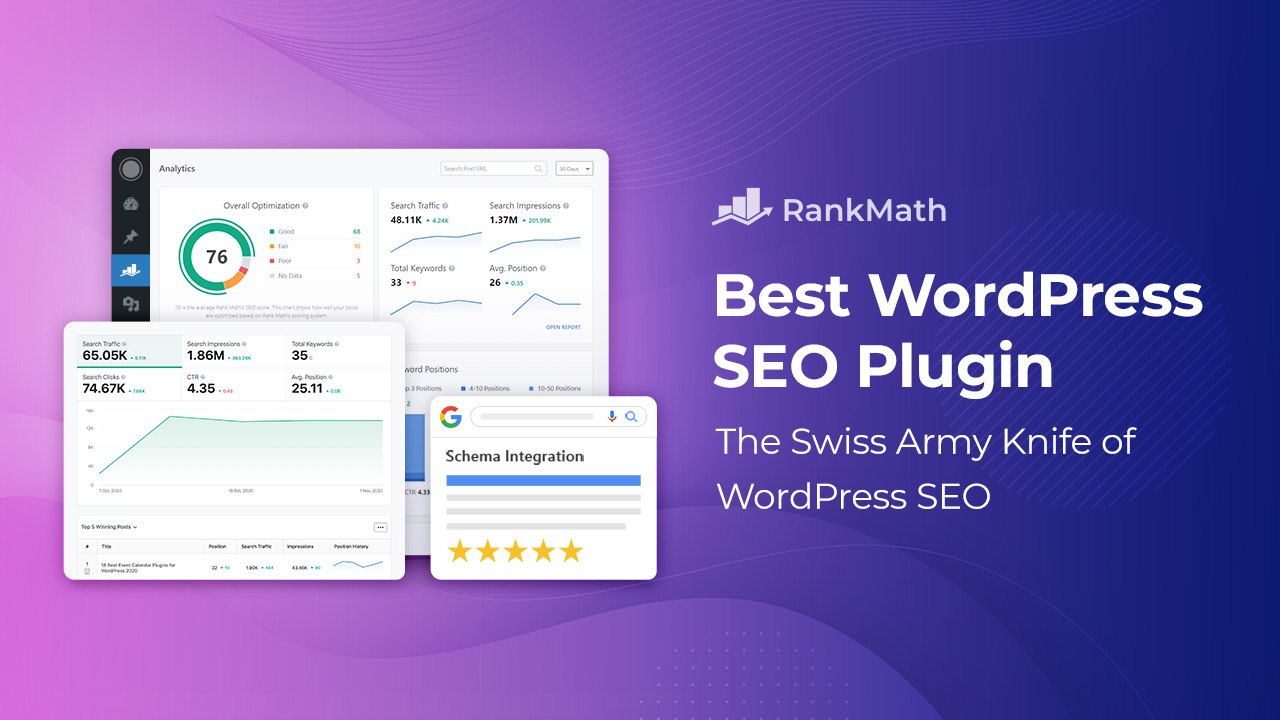
This video introduces a WordPress SEO plugin with the features of many SEO and AI SEO tools in a single package to help multiply your SEO traffic.The video tutorial is over 2 1/2 hours. 

Rank Math is very popular and one of the fastest-growing WordPress SEO plugins, considered a strong competitor to Yoast SEO, with millions of active users, high ratings (around 4.9 stars), and praised for its extensive free features, though Yoast SEO still leads in sheer volume due to its earlier launch. Its popularity stems from offering a robust, user-friendly, feature-rich alternative that includes AI, keyword tracking, and Google Analytics integration, making it a favorite among bloggers and marketers.


Video Timestamps:
00:00 – Introduction
00:44 – Installing Rank Math SEO & Rank Math SEO PRO
00:57 – Installing Rank Math from the WordPress Repository
01:26 – Installing via upload (Rank Math PRO)
02:47 – Create Your Free Rank Math Account

03:22 – Rank Math Set-Up Wizard [How to access + Getting Started]
04:12 – Import from other websites (Business and Agency users)
04:48 – Basic settings [Your Site, Analytics, Sitemaps, Optimisation]
12:07 – Rank Math Set-Up Wizard – Advanced Options [Ready screen with button to access, Role Manager, 404 + Redirections, Schema Markup]


14:15 – SEO Analysis
15:51 – Basic SEO Analysis Tests
18:11 – Advanced SEO Analysis Tests
20:36 – Performance Tests
21:59 – Security Tests


22:58 – Rank Math Dashboard: Modules
24:17 – 404 Monitor
25:41 – Analytics
46:34 – Email Reporting
47:27 – Content AI
47:45 – Image SEO
50:02 – Instant indexing
51:44 – Link Counter
52:07 – Local SEO & Knowledge Graph
53:38 – Redirections
01:01:22 – Role Manager
01:04:04 – Schema (Structured Data)
01:07:14 – SEO Analysis
01:07:33 – Sitemap, Local Sitemap, News Sitemap, and Video Sitemap
01:19:06 – Modules that involve other plugins (ACF, AMP, bbPress, BuddyPress, Google Web Stories, and WooCommerce)
01:20:14 – Help tab in Rank Math’s Dashboard


Read More

01:21:06 – General Settings: Links
01:23:53 – Breadcrumbs
01:25:21 – Webmaster Tools
01:25:51 – Edit robots.txt
01:27:21 – Others
01:30:32 – WooCommerce
01:31:41 – Edit .htaccess
01:32:12 – Resetting Your Settings

Read More
01:32:52 – Titles & Meta
01:33:12 – Global Meta
01:38:12 – Local SEO
01:38:22 – Social Meta
01:39:17 – Homepage
01:39:47 – Authors
01:40:33 – Miscellaneous Pages
01:41:55 – Posts, Pages, Attachments, and custom post types
01:47:42 – Products
01:50:26 – Categories, tags, and custom taxonomies


Read More
01:51:21 – On-page SEO (Optimising Posts)
01:51:56 – Focus keyword
01:54:13 – Content AI
01:57:39 – Content Analysis
01:58:34 – Basic SEO
02:01:11 – Additional SEO
02:04:36 – Title Readability
02:05:45 – Content Readability
02:07:32 – Pillar Content
02:07:51 – Advanced tab
02:10:03 – Schema tab
02:14:26 – Social tab

Read More

02:15:56 – Status & Tools
02:16:11 – Version control
02:17:25 – Database Tools
02:23:10 – System Status
02:24:05 – Import & Export
02:27:00 – Conclusion


YouTube Channel REFERENCE SOURCES
Video: Rank Math Video Tutorial
Description: This video by Rank Math introduces a WordPress SEO plugin, with the features of many SEO and AI SEO tools in a single package.

Microsoft PowerPoint for Beginners


Microsoft PowerPoint For Beginners 

Learn everything you need to effectively use PowerPoint by watching just one video. You’ll learn the modern PowerPoint layout, how to create and save presentations, formatting options, creating and editing tables, creating charts and drawings, printing and publishing options, and more. After watching and mastering this video, you will be able to use PowerPoint effectively in almost any professional or educational setting.


Table Of Contents

00:00 – Introduction
00:21 – PowerPoint Layout & Creating and Editing
09:04 – Opening and Editing Presentations
14:39 – Formatting a Presentation
22:14 – Constructing a Table
25:44 – Creating a Chart
31:09 – Adding Objects to a Presentation
37:17 – Drawing in PowerPoint
40:59 – Refining a Presentation
47:03 – Printing or Exporting a Presentation
49:33 – Delivering a Presentation


Microsoft PowerPoint

Microsoft PowerPoint remains extremely popular, dominating the presentation software market with a massive user base (over 500 million) and high usage, with millions of presentations created daily, holding up to 95% market share and being a standard in business and education despite rivals like Google Slides gaining ground.


YouTube Channel: Technology for Teachers and Students :
Description: The channel is all about clear tutorials, helpful tips and tricks for teachers, and reviews of Educational Technology.
Subscribers: 1.8 Million  |  695 Videos
Author : A full time class teacher, part time trainer with a real interest in Educational technology and innovation.


Google Slides Complete Beginners Overview


GOOGLE SLIDES |

This is a complete overview by  Flipped Classroom Tutorials of all the options and features of Google Slides. Slides is Google’s answer to presentation Software. It’s fast, cloud based, works offline and has some very useful features. Especially when tied into G Suite and used in the classrooms, Google Slides is not only a great platform for collaboration, its also a wonderful suite of tools that enables your students and teachers to quickly create a presentation that looks professional without wasting any time!


TimeStamps: 17.49

Click To See Transcript
[00:00] Intro
[00:20] Who can get Slides?
[00:45] How Do I create a new Slideshow? Different ways of creating the files.
[01:05] URL Shortcut for New Slides
[01:20] Name your File
[01:30] Organise your files by selecting a folder
[01:55] Star your files for easy work
[02:13] What are Themes or Templates in Google Slides
[03:04] How do I add a new Slide to Google Slides
[03:15] Add a Slide with pre-arranged object and placeholders
[04:00] What can we add to our Slides?
[04:20] Insert and image into your Slide
[04:25] Why use the built-in Search for insert image?
[04:45] Insert with Safe Search
[05:20] Format Images
[05:40] Use the Explore function in Slides for easy design
[06:34] Speaker Notes
[06:45] How to see speaker note when presenting
[07:00] What is different about the Presenter View in Slides?
[07:30] Timers when presenting in Presenter View
[07:43] Audience Tools
[07:50] Q&A in Presenter view with Google Slides
[08:15] Q&A as a back-channel
[08:50] How to hide of Skip a slide
[09:30] Insert Video from YouTube
[09:50] Insert Video with Safe Search
[10:00] Format Options for Start and End Times
[10:30] Video Playback Options
[11:30] Version History and Version Info
[12:30] Insert a Chart from Scratch or Use charts from Spreadsheets
[12:45] Keep your Chart Linked to have an up to date Chart
[13:15] Animations and Transitions in Slides
[14:20] How to Auto play a Presentation by Publishing the Slides
[15:00] Auto advance the slides at a set time
[15:20] Copy Slides from Presentation to Presentation and KEEP them LINKED
[16:20] See all your linked objects
[16:40] Link within the Slideshow to different Slides(Great for Choose your Own Adventure style Slideshows)

Video: Tutorials

Video tutorials are highly successful learning tools, boosting engagement and comprehension by offering visual, flexible, and practical instruction, with studies showing improved performance and high user preference for video over text for learning, though effective design is crucial for managing cognitive load and maximising benefits. 


YouTube Channel REFERENCE SOURCES
Flipped Classroom Tutorials:
240K YouTube Subscribers

Description: 
This channel is all about clear tutorials, helpful tips and tricks for teachers, and reviews of Educational Technology.  Who is the author? A full time class teacher, part time trainer with a real interest in Educational technology and innovation.

Google Docs for Beginners


Learn Google Docs

Learn everything you need to effectively use Google Docs by watching just one video. You’ll learn terminology and the Google Sheets layout, how to create workbooks, entering values into Sheets, formulas and functions, formatting, creating and editing charts, printing options, and publishing options. After watching and mastering this video, you will be able to use Google Sheets effectively in almost any professional setting.


Table of Contents

00:00 Introduction
00:45 Accessing Google Docs
02:10 Creating a New Document
03:25 Basic Navigation and Interface
05:00 Typing and Formatting Text
07:15 Paragraph Formatting
09:30 Inserting Images and Media
11:20 Adding Links and Bookmarks
13:05 Using Tables
15:00 Page Setup and Layout Options
16:45 Sharing and Collaboration
18:30 Comments and Suggestions
20:10 Version History and Restore
21:45 Downloading and Printing
23:00 Final Tips and Wrap-Up

YouTube Channel:  Techhnology for Teachers and Students
Subscribers: 1.84m


Google Docs is a free, web-based word processor that lets you create, edit, and collaborate on documents from any device with internet access, featuring real-time co-editing, automatic saving to the cloud (Google Drive), and integration with other Google apps like Sheets and Slides. It’s known for its powerful collaboration tools, allowing multiple users to work simultaneously, see changes instantly, and use comments, making it ideal for teams and projects.

Google Docs is used by a massive, diverse audience, including students, educators, small businesses, startups, large enterprises (like Salesforce, DoorDash), and individuals for personal projects, with its primary appeal being seamless real-time collaboration, cloud accessibility from anywhere, and easy sharing, making it ideal for teamwork, remote work, and educational assignments.


Key Users & Sectors:

Education: Students use it for group projects, while teachers create lesson plans and provide feedback.
Businesses: Teams in sales, marketing, HR, and more use it for shared documents, project management, and internal communication, notes Google Workspace.
Startups & Small Businesses: Its free nature and collaborative features make it a strong choice, says QuickBooks.
Individuals: Writers, freelancers, and anyone needing a flexible word processor for personal use.

Virtual Training

VIRTUAL TRAINING IN UK SCHOOLS 

Virtual training is live, instructor-led online learning that replicates a classroom experience through video conferencing, allowing real-time interaction, discussions, and activities from different locations, offering flexibility and cost savings over traditional in-person training. It’s distinct from self-paced e-learning, focusing on synchronous, engaging, and interactive sessions that use digital tools like polls, chat, and breakout rooms for practical skill development, often for corporate training and certifications

Around 64% of UK schools integrate technology into daily teaching and learning, a figure from research by SMART Technologies, placing the UK high globally for educational technology (EdTech) adoption, though challenges with connectivity, funding, and training persist alongside benefits like enhanced engagement and personalised learning.

It’s difficult to pinpoint an exact number for how many schools in the UK utilise virtual training, as the term “virtual training” can encompass various approaches, including online learning platforms, virtual school settings, and professional development for teachers.  There is however, a growing trend of schools embracing online learning and virtual training, with examples like Minerva Virtual Academy UK Virtual School, and numerous schools participating in the Attachment Aware training program

The training program aims to enhance school staff’s understanding of attachment theory and trauma-informed practices to better support students, particularly those who have e xperienced trauma or neglect.  These programs often involve whole-staff training,ongoing support through networks, and collaboration with professionals like educational psychologists.  The goal is to create a more nurturing and responsive school environment that fosters positive relationships and improved outcomes for all students.


Different Aspects Related To Virtual Training In UK Schools

1. Online Learning Platforms &  Virtual Schools:

Examples:  Minerva Virtual Academy is a DfE-accredited online school for 11-18 year olds, demonstrating the existence of dedicated online learning environments.

Growth:
There’s an increasing number of schools adopting online learning platforms and virtual school models to cater to diverse needs.


Focus:
These platforms often offer flexible learning options, personalised support, and access to a wider range of subjects.


2. Virtual Training For Staff:

Purpose: Schools utilise virtual training to enhance professional development for teachers and staff, covering areas like trauma-informed practices, special educational needs, and other relevant topics.View related links.

Examples:
Worcestershire Virtual School offers training and bespoke packages for schools, and the Attachment Aware training program in Essex is another example of virtual professional development.

Accessibility:
 
Virtual training allows schools to access professional development opportunities regardless of location or time constraints.


3. Government Initiatives:

Optional Training: The Schools (Mental Health Professionals) Bill notes that while certain training is optional, the government is committed to offering it to all eligible schools and colleges by 2025.

Quality Assurance:Ofsted blog
is working on quality assuring online providers of full-time education, ensuring standards are met.


4. Trends In Online Learning:

Growing Adoption: There’s a rising trend of individuals using online learning platforms for personal development, including video platforms like YouTube.

AI Integration:  Some schools are also exploring the use of generative AI tools for teaching and learning, as noted in the GOV.UK report. In conclusion, while it’s hard to give an exact number, virtual training is becoming increasingly prevalent in UK schools, both for students through online platforms and for staff through professional development programs.


Websites Made Easy

Best SEO Certification

What Is The Best SEO Certification?

SEO, or Search Engine Optimisation, refers to improving a website’s ranking in search engine results pages (SERPs).  The best Google certification for SEO would be the Google SEO Fundamentals course offered by Coursera, which covers essential SEO practices and strategies. This certification can provide a solid foundation for understanding and implementing SEO techniques.  Your experience setting up multiple Amazon stores can potentially be recognised for college credit or certifications, but it depends on the specific institution and the type of credit or certification you are seeking. You can explore options like Prior Learning Assessment (PLA) or seeking certifications in areas like e-commerce or digital marketing, which align with your skills.


Here’s A More Detailed Explanation:

1. Prior Learning Assessment (PLA):

Many colleges and universities offer PLA programs, which allow students to earn college credit for learning gained outside of traditional classroom settings, like your experience with Amazon stores.

You would need to demonstrate your knowledge and skills through a portfolio, exams, or other assessments to show that you have met the learning outcomes for a specific course or program. Contact the admissions or academic advising department at the colleges you are interested in to inquire about their PLA process and whether your experience qualifies.


2. Certifications:

E-commerce or Digital Marketing Certifications:
Several organisations offer certifications in e-commerce, digital marketing, and related fields. These certifications can be a good way to demonstrate your skills and knowledge to potential employers or educational institutions.

AWS Certifications:
If your experience with Amazon stores involves using Amazon Web Services (AWS), you could consider pursuing AWS certifications. These certifications demonstrate your expertise in using AWS cloud computing services.

Online Courses and Certifications:
Many online platforms offer courses and certifications in e-commerce, digital marketing, and related areas. These can be a good way to build your knowledge and skills and obtain a recognised credential.

Industry-Recognised Certifications:
Look for certifications that are widely recognised by employers in the e-commerce or digital marketing fields.


3. College Programs:

Associate’s Degrees: Some community colleges and vocational schools offer associate’s degrees in e-commerce, digital marketing, or related fields.

Bachelor’s Degrees: If you are interested in a more comprehensive education, you could consider pursuing a bachelor’s degree in a related field.

Amazon Career Choice Program: If you are an Amazon employee, you may be eligible for Amazon’s Career Choice program, which provides financial assistance for employees to pursue education and training in in-demand fields.


4. Tips For Getting Recognised:

Document your experience: Keep records of your work on Amazon stores, including the types of products you sold, your sales strategies, and any challenges you overcame.

Build a portfolio: Create a portfolio that showcases your work and demonstrates your skills and knowledge.

Network: Connect with professionals in the e-commerce and digital marketing fields to learn about their experiences and get advice.

Be prepared to demonstrate your skills: Be prepared to demonstrate your skills through interviews, presentations, or other assessments. By exploring these options and taking the necessary steps to document and demonstrate your skills, you can potentially get recognised for your experience and achieve your goals of earning college credit or certifications. 


What Is The Best SEO Certification?

The best Google certification for SEO would be the “Google SEO Fundamentals” course offered by Coursera, which covers essential SEO practices and strategies. This certification can provide a solid foundation for understanding and implementing SEO techniques.

Average Salary For An SEO Specialist

The average salary for an SEO specialist in the UK varies, but generally falls between £32,500 and £33,351 per year. Salaries can range from £27,500 for entry-level positions to over £45,000 for experienced specialists. Factors like experience, company size, and location can significantly impact the salary.

According to UK Indeed the average salary for a SEO Specialist is £33,192 per year or £16 per hour in United Kingdom, which is in line with the national average. 

Glassdoor a website and online community where current and former employees anonymously review companies, share salary information, and provide insights into the interview process. It serves as a resource for job seekers to research potential employers and for companies to understand employee sentiment and improve their employer brand. 

Glassdoor reports that SEO salaries in Cardiff,  range from £24K to £37K per year for SEO Analysts, with an average base pay of £30K. While  SEO Executives can expect salaries between £27K and £32K,  salaries can vary based on experience, specific roles, and the employer. For instance, a Senior SEO Manager at Confused.com might earn between £48K and £56K, while an SEO Specialist at Liberty Marketing might earn around £33,077 per year.


References | SEO Glossary | UK Indeed | Glassdoor


Websites Made Easy

Instructor-Led Training vs. E-learning

WordPress Video Tutorials


Instructor-Led Training vs. E-learning:

Making the Right Choice

Discover the differences between Instructor-Led Training (ILT) and E-Learning in employee training. Uncover their advantages and drawbacks to make informed choices. Dive into this guide for valuable insights!

When you’re exploring how to learn and grow your skills, you’ve got two main roads to consider: Instructor-Led Training (ILT) and eLearning. These paths offer different ways to gain knowledge and sharpen your abilities. ILT is the classic classroom setup, with an instructor guiding the learning process. On the other hand, E-learning happens online, allowing you to learn anytime from a device with internet access. This article dives into the differences between these methods—ILT’s structured approach and eLearning’s web-based convenience—to help you find the right fit.

Let’s explore the pros and cons of each to determine the best approach for your learning journey.


Understanding Instructor-Led Training (ILT)

Before diving into its benefits, let’s get a clear picture of what instructor-led Training (ILT) means. So, what is instructor-led Training? It’s like being in a classroom, either physically or in a live online session, where a teacher leads the way in teaching. The teacher uses a style of teaching that’s a lot like a lecture, often giving out assignments to help you learn better. This method is considered quite effective because the live teacher can connect with each person in the class, making the learning more personal. But just like anything else, there are good things and not-so-good things about this way of learning. How good it is mostly depends on how good the teacher is and how much subject matter they cover.

To understand more about ILT, what it means, and when it’s a good idea to use it, let’s explore the advantages and challenges of this way of learning.


Advantages of Instructor-Led Training

  1. Real-Time Questions and Feedback

ILT excels in providing immediate answers to queries and addressing feedback in real-time. The live instructor, whether in-person or online, offers on-the-spot responses, ensuring all participant concerns are promptly attended to.

  1. Adaptability

The flexibility of ILT lies in its live nature, allowing for adjustments on the fly. Instructors can pivot and tailor the lesson to cater to the classroom’s specific needs, ensuring a more relevant and comprehensive learning experience.

  1. Experiential Benefits

Employing interactive methods within ILT adds substantial value. Instructors can seamlessly transition from engaging in large discussions to utilising breakout rooms and role-playing scenarios, actively involving all participants in the learning process.


Challenges of Instructor-Led Training (ILT)
  • High Implementation Cost

ILT demands significant investment in terms of both time and money. This includes expenses related to instructor preparation, materials, and logistics for in-person sessions.

  • Inconsistent Messaging and Teaching Styles

This may lead to inconsistent learning experiences for participants.

  • Time Away from Work

Participating in ILT often means employees have to set aside dedicated time, causing interruptions in their daily work routine.

  • Interruption to Daily Tasks

Engaging in ILT sessions can disrupt the workflow and productivity of employees, impacting their regular tasks and responsibilities.


Understanding E-learning

So, what exactly is E-learning? E-learning, short for electronic learning, refers to online training that happens wherever and whenever you want. Imagine having the ability to learn using your computer or device, without being tied to a specific place or time. That’s what eLearning offers – the flexibility to learn at your own pace and in your own comfortable space. Imagine having the classroom at your fingertips, seamlessly integrating learning into your schedule without disrupting your work or personal commitments.

Advantages of E-learning

E-learning brings notable benefits for companies. Did you know that over 40% of Fortune 500 companies rely on E-learning? There’s a reason behind this. Here’s a glimpse of what makes it so valuable:

  • Cost and Time Savings:

It saves companies money and significantly reduces time away from an employee’s workday. Compared to traditional classroom training, E-learning takes up to 40-60% less time.


Websites Made Easy